


.png)
Sample ATS Friendly Resume: What One Actually Looks Like (and How to Build Yours)
- Jon Irwin

- Apr 28
- 5 min read
Most job seekers never see a real, ATS-friendly resume, so they optimize for the wrong things. Here is exactly what an applicant tracking system wants, complete with a working template and the mistakes that quietly kill your chances.
OneClick Smart Resume Resume Intelligence · ATS Optimization
98% of Fortune 500 companies use an ATS to screen resumes
75% of qualified applicants are rejected before a human ever sees their resume
6 seconds is the average time a recruiter spends on a resume that does make it through
You searched for a sample ATS-friendly resume because you suspect your current resume is not passing the first filter. You are likely right. The majority of applications never reach a human reviewer. An applicant tracking system (ATS) reads your resume, scores it against the job description, and either forwards it or permanently archives it. If your formatting, keywords, or structure trip the parser, the game is over before a recruiter ever sees your name.
This guide walks you through what a real ATS-friendly resume looks like, why each element matters, and how to build one that scores well on any major ATS platform, including Workday, Greenhouse, Taleo, iCIMS, and Lever.
What makes a resume ATS-friendly?
An ATS-friendly resume is not about making your document look plain or boring. It is about removing the structural barriers that cause parsers to misread or skip your content entirely. Before the system can score you on keywords, it needs actually to read your text. That starts with format.
Format rules the ATS cares about
Plain .docx or text-based PDF only. Scanned image PDFs, Canva exports, and graphic design files fail parsing on every major platform.
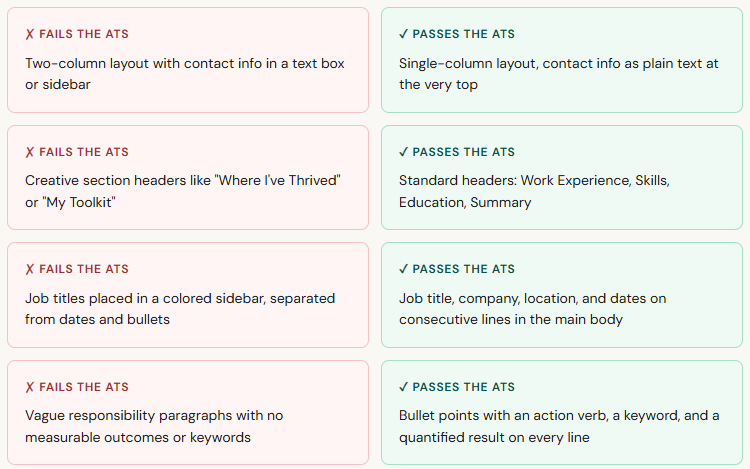
Standard section headers only: Summary, Work Experience, Education, Skills. Creative labels like "My Story" or "Where I've Been" are not recognized by most parsers.
No text boxes, tables, multi-column layouts, headers, or footers. These break parsers cause your contact information or job titles to disappear entirely from the extracted text.
Standard fonts: Calibri, Georgia, or Times New Roman at 10-12pt. Decorative fonts can render as symbols in some parsers, corrupting surrounding content.
Standard bullet points (•) only. Checkmarks, arrows, and custom Unicode symbols frequently parse as blank lines, wiping out your accomplishments.
No photos, logos, icons, or graphics of any kind. These either get skipped entirely or cause parse errors that corrupt the surrounding text block.
A sample ATS-friendly resume (annotated)
Below is a full, ATS-friendly resume sample for a mid-level marketing professional. Each section is built to pass parsing and score well on keyword matching. The highlighted terms represent keywords mirrored from a typical job posting for this role, which is the core of how ATS scoring works.

Highlighted terms = keywords mirrored directly from a target job description. The ATS matches these against the posting and generates a relevance score before any human reviewer sees your application.
The keyword strategy that actually works
Most guides tell you to "add keywords." That is not specific enough to help. Here is the actual process for building an ATS resume that consistently scores at the top of a candidate pool.
Copy the full job description into a text document
Do not skim it. The language the employer uses in the job description is the exact language the ATS is configured to match against. Every word in that posting was intentionally included.
Identify the hard skills, software, and certifications named
These are non-negotiable match points. If the posting says "Salesforce CRM" and your resume says "CRM software," the ATS may score that as a miss. Mirror the exact phrasing wherever you genuinely have that experience.
Identify the action verbs and outcome language used
Postings often include phrases like "drives cross-functional alignment" or "manages pipeline growth." Weave those phrases into your bullet points using your actual accomplishments as the context.
Distribute keywords across three zones.
The professional summary carries high weight, work experience bullet points carry medium weight, and the skills section carries medium weight. Dumping keywords only into a skills list scores in just one zone.
Never fabricate a keyword to pass screening.
ATS scores get you to the interview. If you claimed competency in a tool you do not have, the interview surfaces it immediately. Optimize honestly against your real background.
Common mistakes that break an otherwise strong ATS resume
Does every company use an applicant tracking system?
Not every employer, but significantly more than most job seekers assume. Any organization running Workday, Greenhouse, Lever, iCIMS, BambooHR, or Taleo is routing your application through an ATS before a human sees it. That covers the overwhelming majority of mid-size and enterprise employers in the United States.
Small businesses posting directly on LinkedIn or Indeed sometimes review applications manually, but even LinkedIn applies its own algorithmic ranking before surfacing applicants to hiring managers. The practical answer is simple: build every resume to be ATS-friendly. A clean, well-structured, keyword-rich document reads better to humans, too. There is no downside to getting this right.
Quick Test
Copy your resume text into Notepad or another plain-text editor with formatting disabled. If the content looks scrambled, out of order, or missing sections, an ATS parser will read it the same way. Fix the structure before you apply.
ATS-friendly resume vs. a visually designed resume
There is a persistent myth that you need two separate documents: one for ATS and one for humans. That is only true if your designed resume relies on text boxes, columns, headers, and footers, or graphics to create its layout. If you build your visual design using only standard paragraph formatting, bold text, and spacing, the same document can be both visually clean and fully parseable.
What you should never submit: a Canva resume, a heavily designed template from a premium resume site, or anything built inside a graphics program. These almost always fail the first parse, and your candidacy ends before it begins, regardless of how strong your background is.
How OneClick Smart Resume optimizes your ATS score automatically
Building a tailored ATS resume manually for each application is time-consuming because the right keywords change with every job description. OneClick Smart Resume analyzes the specific posting you are targeting, identifies the highest-weight keywords the ATS is likely configured to match, and rewrites your relevant experience to mirror that language using your real background.
The result is a tailored, ATS-friendly resume specific to each role rather than a generic template sent to every opening. Members who use OneClick for active job searches report a measurable increase in callback rates because they stop submitting the same resume everywhere and start submitting an optimized application every time.
Get your free ATS resume score.
Paste your resume and a job description. OneClick shows you exactly which keywords you're missing and how to fix them in under 2 minutes, at no cost.
OneClick Smart Resume — Detroit, MI · Built by job seekers, for job seekers.


Comments